
Welcome to the lava.top API portal!
Introduction
If anything is unclear, feel free to contact our support team: support@lava.top.
General Information
Integration is the process of connecting two or more services using an API. It allows systems to exchange data and events, enabling them to work together in an automated and coordinated way.
With lava.top, you can set up integration with any external system, service, website, or Telegram bot — to accept and track payments, manage access, and control subscription statuses. This makes your workflows simpler and more convenient.
API — lava.top's public programming interface that allows external software and applications to interact with each other over the network.
API Key — a unique code used for the authorization and authentication of an API client. Think of it as a login and password, but for software — without it, you can't access the data or features provided by the API.
Webhook — a mechanism that allows one service to automatically send data to another in response to certain events. In simple terms, it’s a notification your system receives when something happens. Instead of constantly asking the server “what’s new?”, you configure a URL once, and the server notifies you when needed.
Refund — a full or partial return of funds to the customer for a completed sale. Initiated by the creator, support, or the system. The refunded amount is debited from the creator's balance; the platform fee is not returned.
Chargeback — a payment dispute raised by the customer through their bank. Initiated outside the platform. By the time we receive the dispute, the amount and the provider fee have already been debited from the creator's balance.
Typical scenarios for using our API:
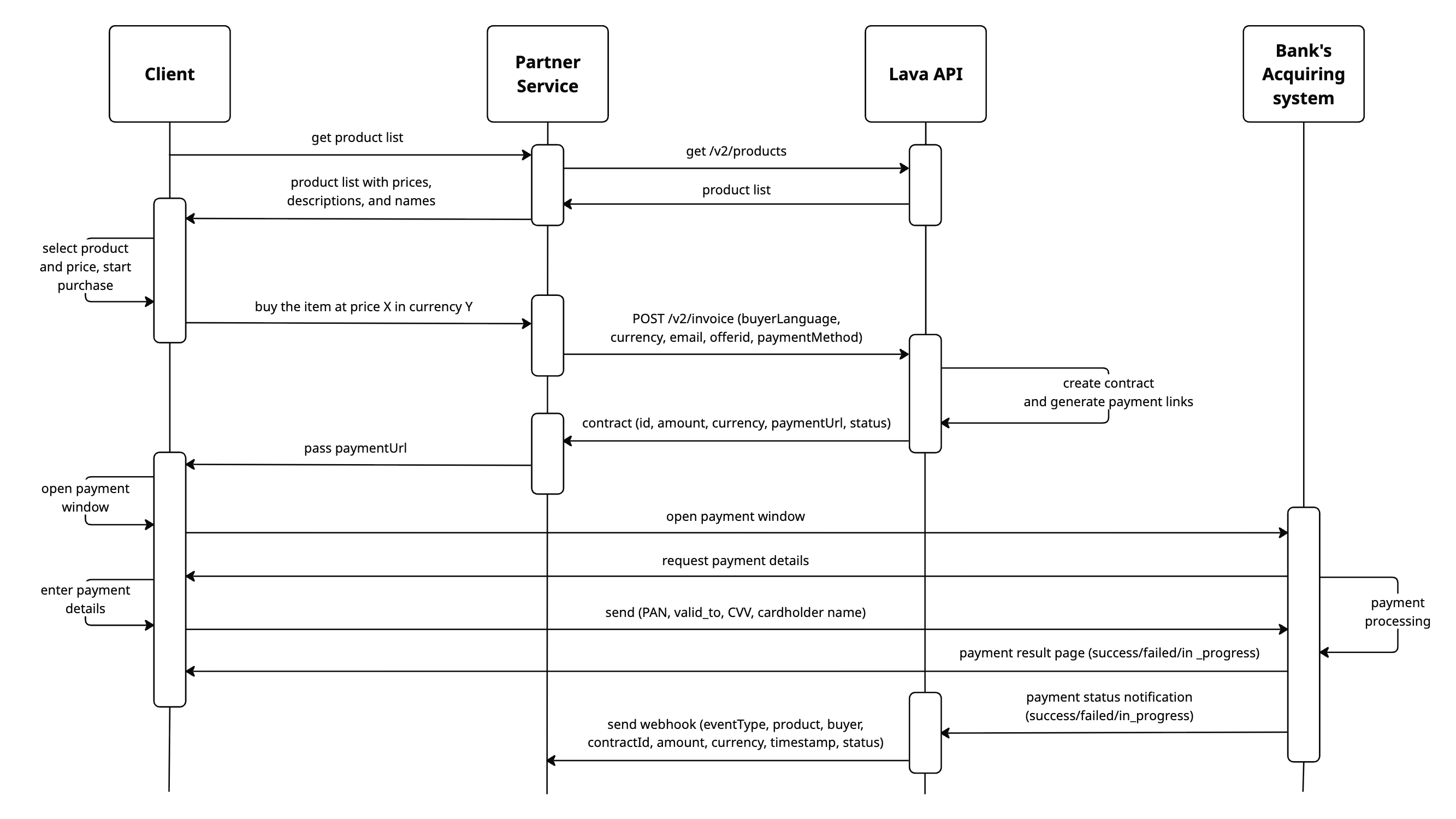
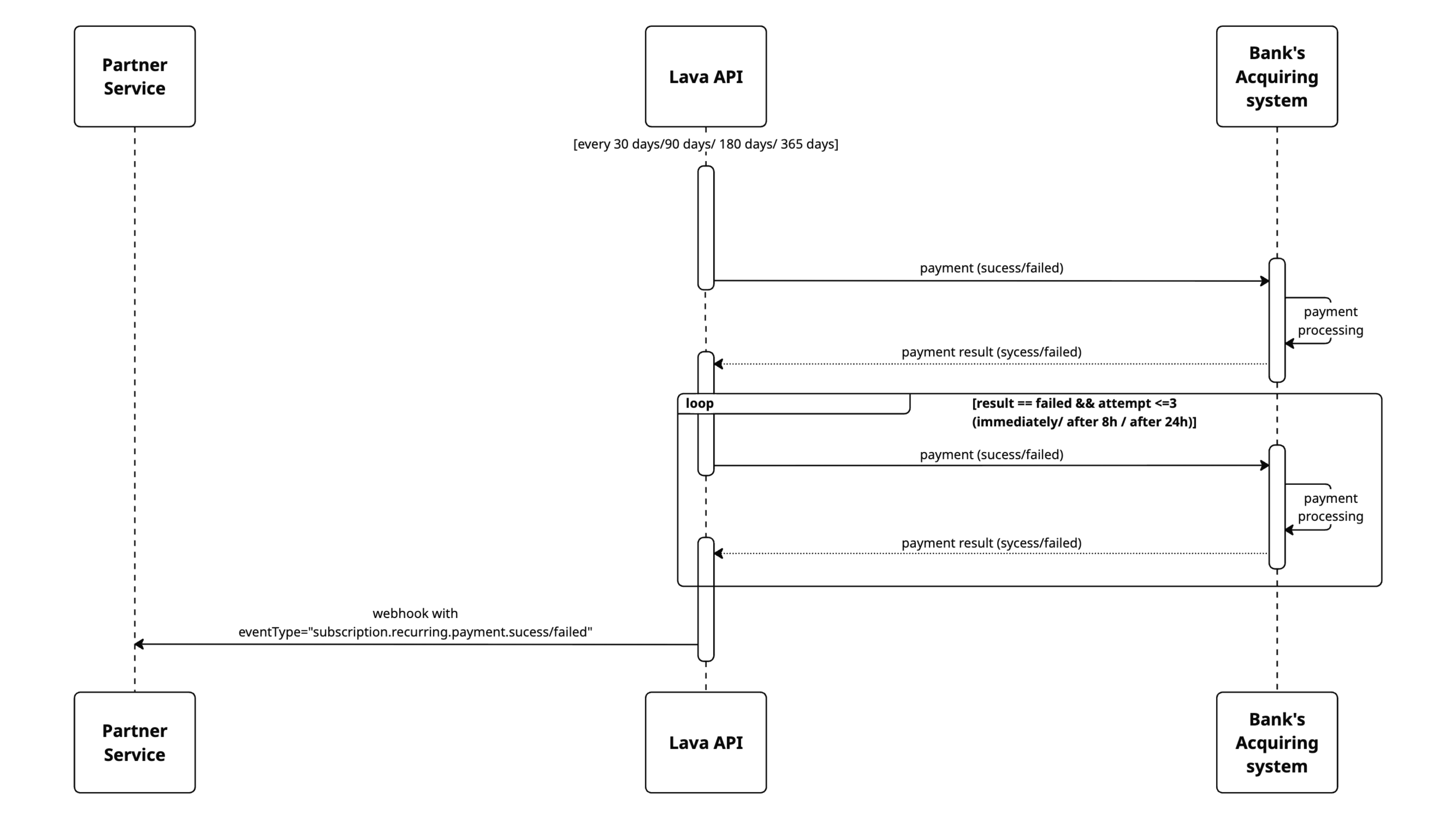
API Key and Webhook Setup
To get started with integrating your service on the platform, you need to create an API key and set up a webhook.
How to Create an API Key
- Go to Integrations section, choose API.
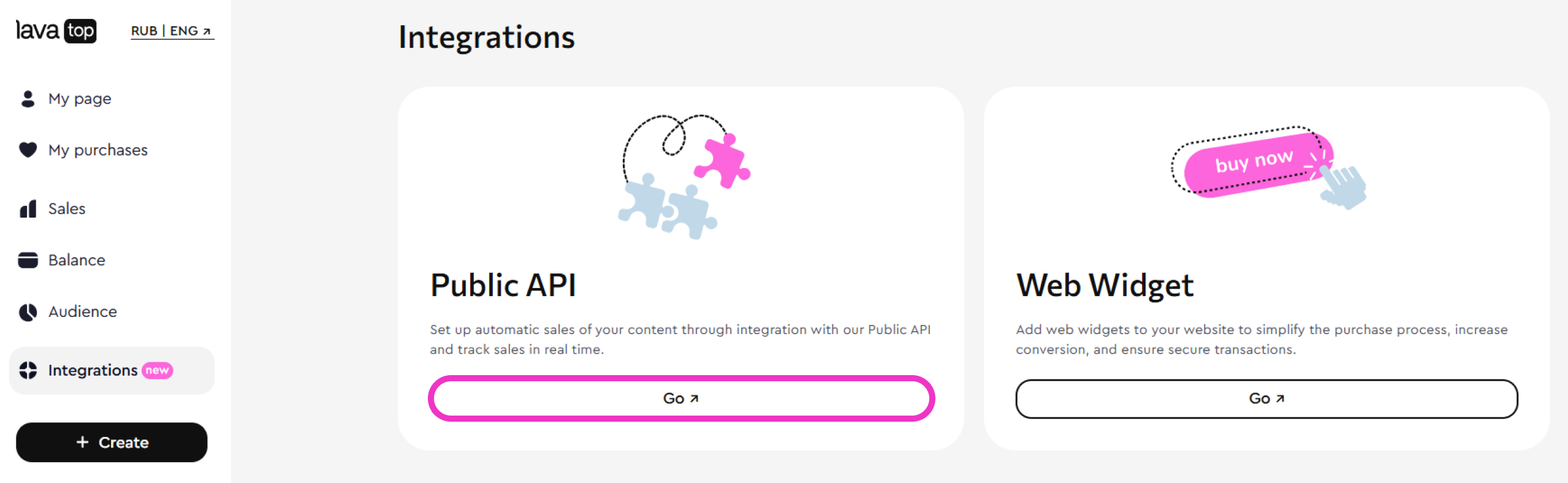
- Click Create API Key.
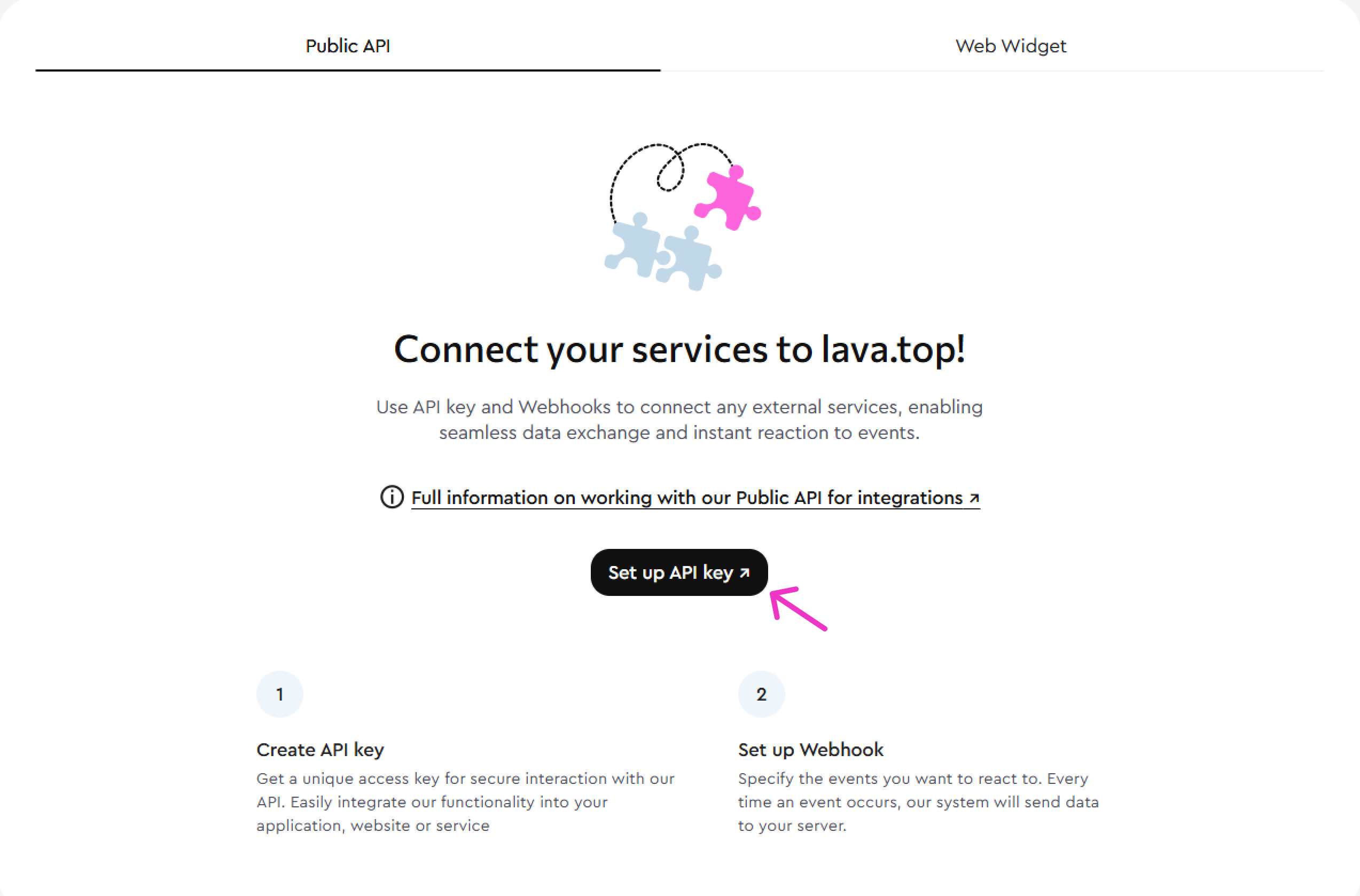
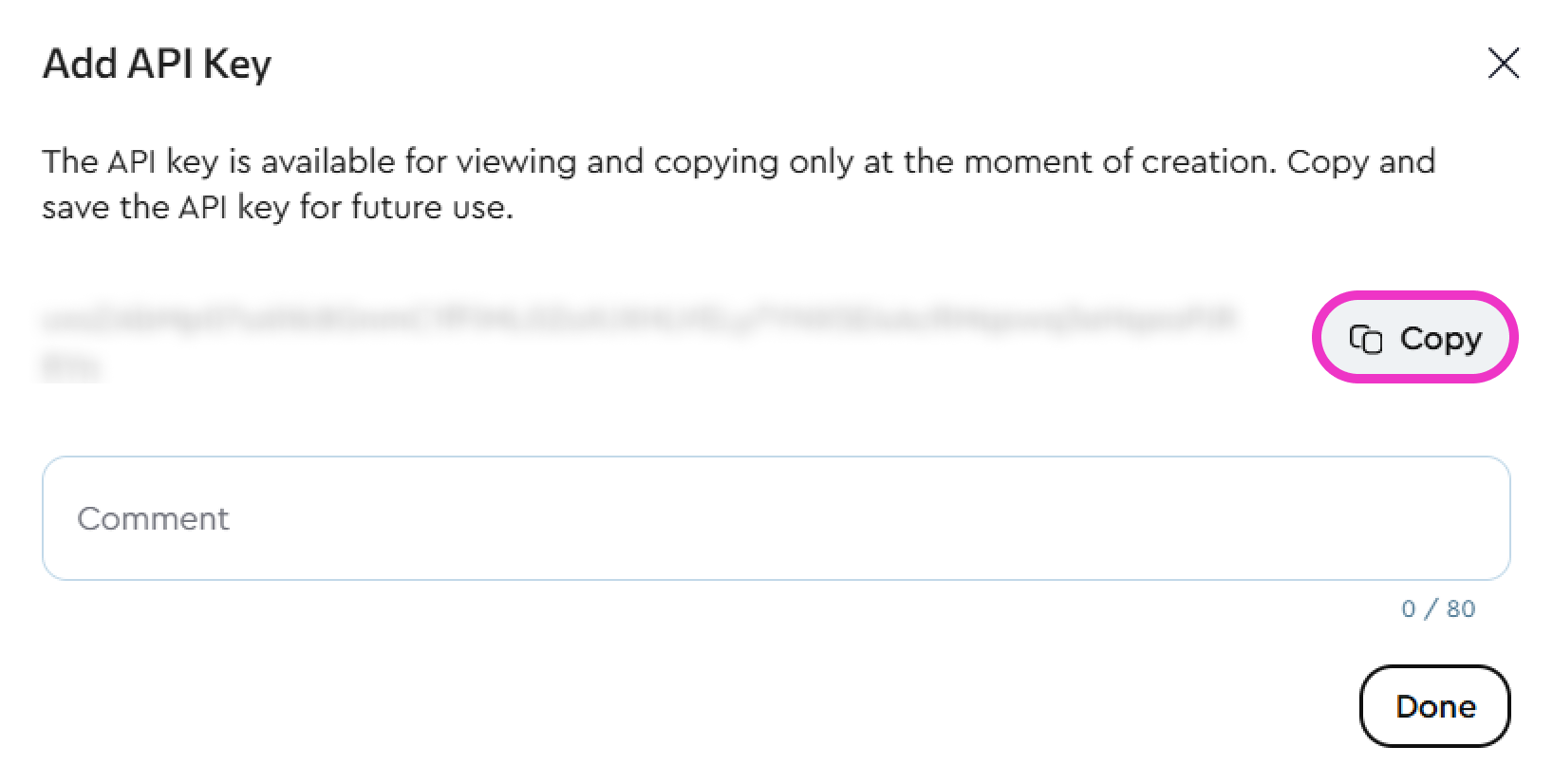
- The platform will generate the key automatically — copy it and save it securely on your device.
How to Set Up a Webhook
- Create an API key and confirm that you’ve saved it.
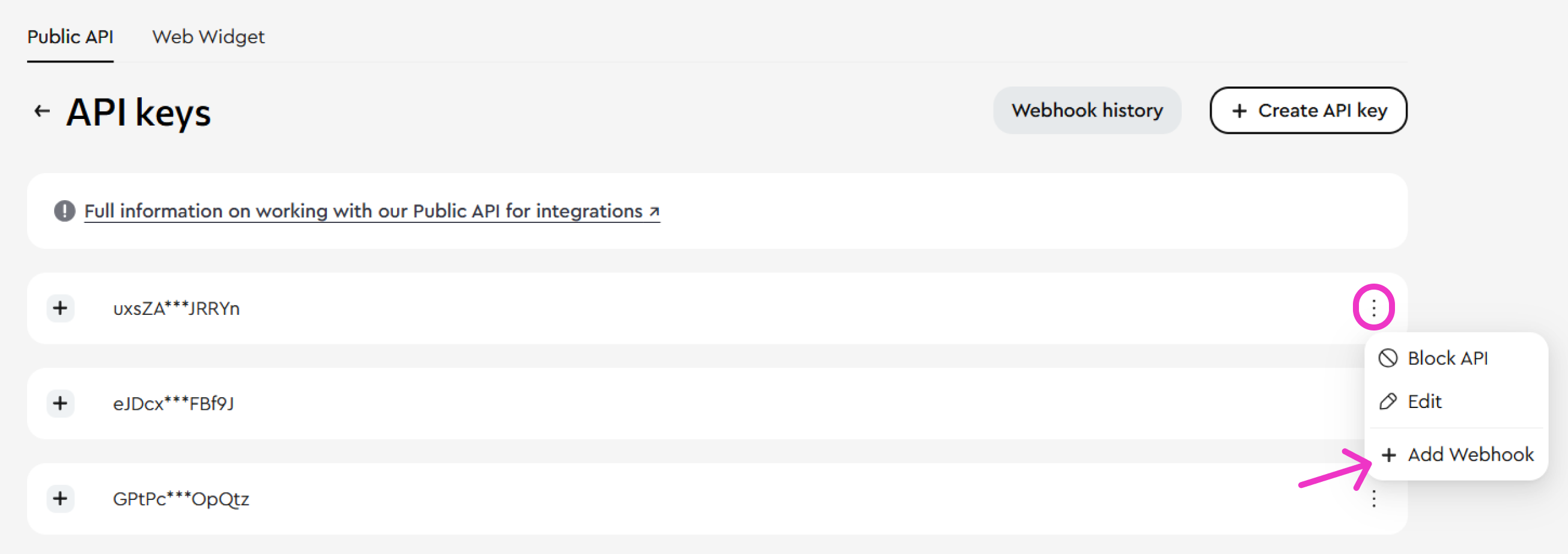
- Click the Add Webhook button.

- Fill in the following fields:
- URL — the endpoint on your server where webhook data will be sent (this is the address that will receive and process requests).
- Event type:
- payment.success — Successful payment
- payment.failed — Failed payment
- subscription.recurring.payment.success — Successful subscription renewal
- subscription.recurring.payment.failed — Failed subscription renewal
- subscription.cancelled — Subscription cancelled
- refund.success — Successful refund
- chargeback.initiated — Chargeback request received
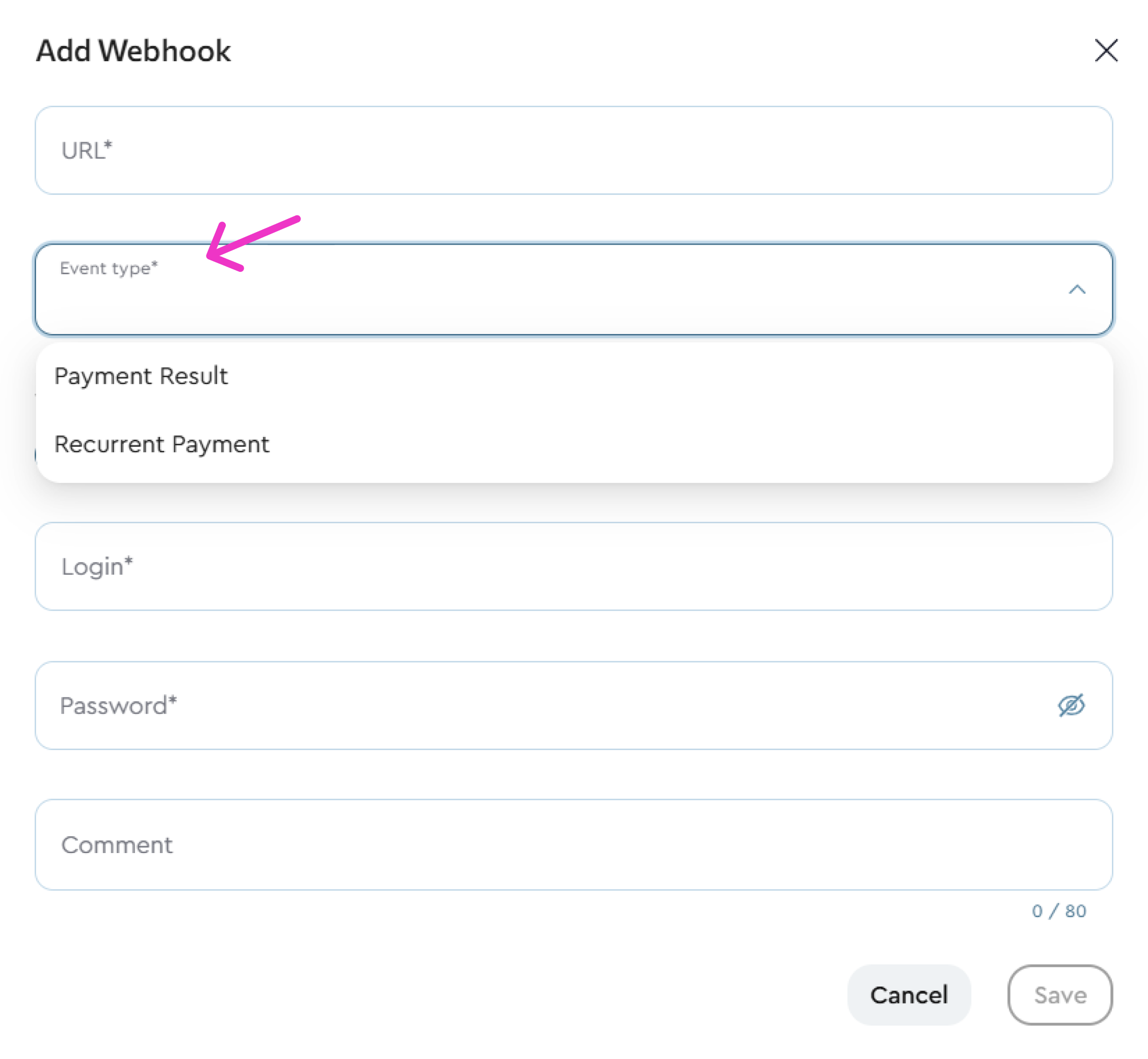
A single webhook receives any set of events — select the ones you need from the list. You do not need a separate webhook per event. If it suits your setup, you can split events across URLs: payments to one address, refunds and chargebacks to another.
The "Successful refund" and "Chargeback request received" events are delivered only if selected. Before enabling them, make sure your handler returns 2xx for any event, including ones it does not recognise.
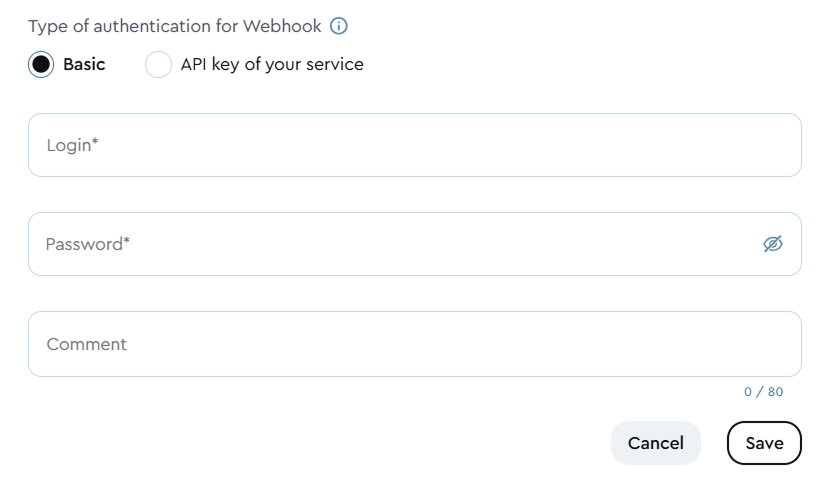
- Choose an authentication method:
- Basic - enter the login and password for your service that will receive webhook requests.
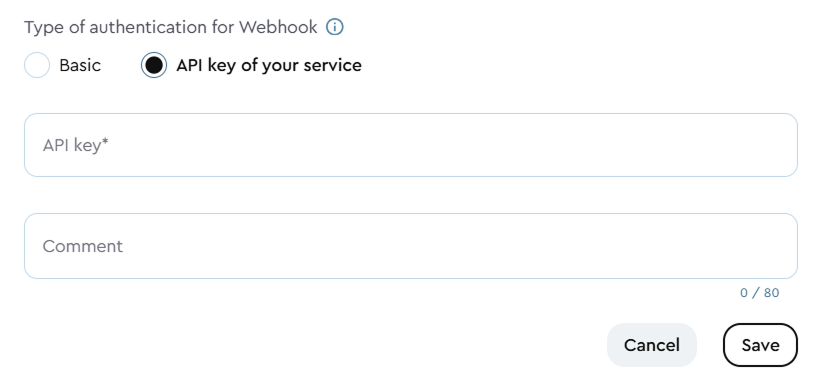
- Your service’s API key - enter the API key of your service that will receive the webhook requests. Maximum key length: 80 characters.
Basic authentication: lava.top will send webhook requests to the specified URL using HTTP Basic Authentication. The request will be sent in the format: user:pass@example.com. Only HTTPS connections are allowed for this type of request to ensure security.
API Key Authentication: lava.top will send webhook requests to the specified URL, authenticated using an API key.The receiving server must extract the key from the HTTP header: "X-Api-Key".
Click the three dots next to the desired key and select Add Webhook.
API Documentation
API Documentation
To get a detailed overview of available API methods, refer to our API documentation.
The documentation follows the Open API v3.0.0 (Swagger) specification.
You can find API methods grouped by the most common use cases:
Products - work with digital products: fetch the product list and update their parameters (e.g., price).
IInvoices — for creating purchase invoices (including invoices for custom amounts), checking their status, and setting up the customer's return to the creator's page after payment.
The /api/v2/invoices and /api/v3/invoice methods are available.
Custom Price Invoices - allows creating a contract with a custom price for products published with the 'Price on request via API' flag. The amount and currency are set per request, without changing product settings.
Reports - access sales analytics data via the API.
Subscriptions - manage user subscriptions.
Donate - generate donation links.
Interactive documentation allows you to test each method and ensure it works correctly.
- provide your API key:
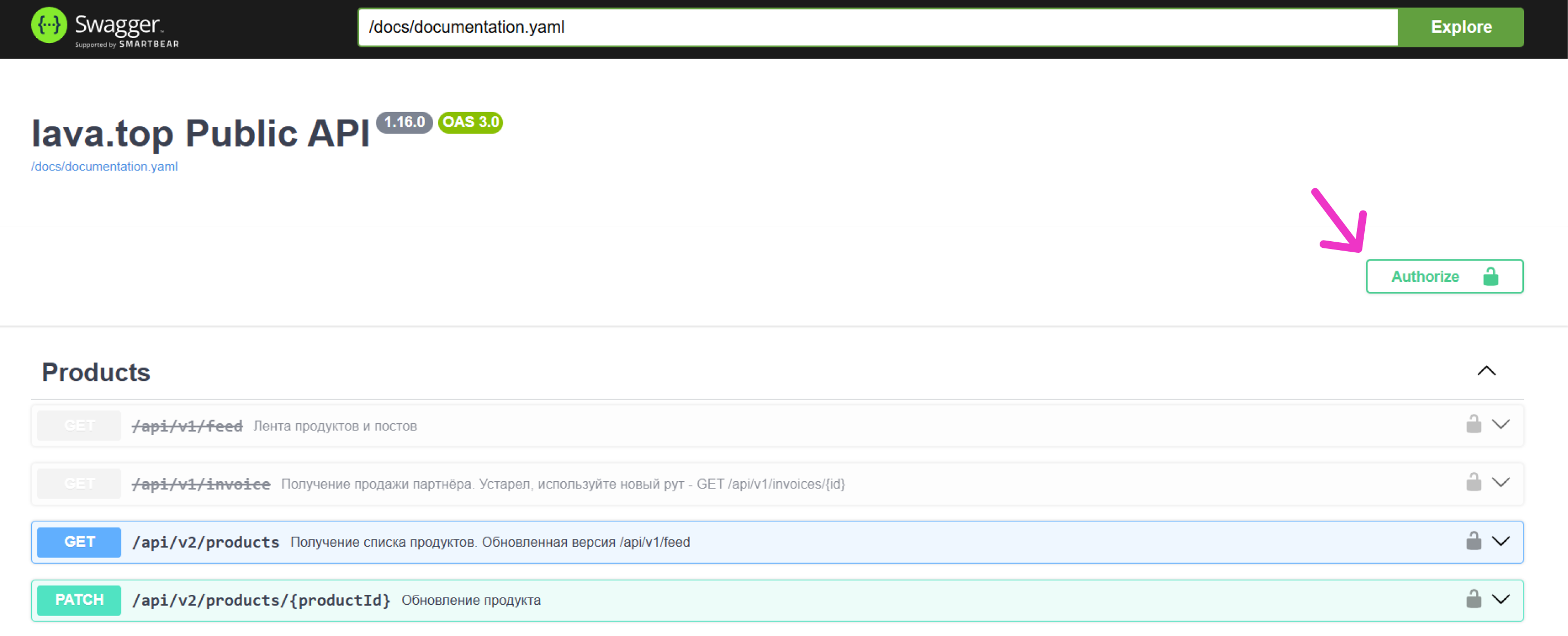
- Click Authorize in the top-right corner of the page:
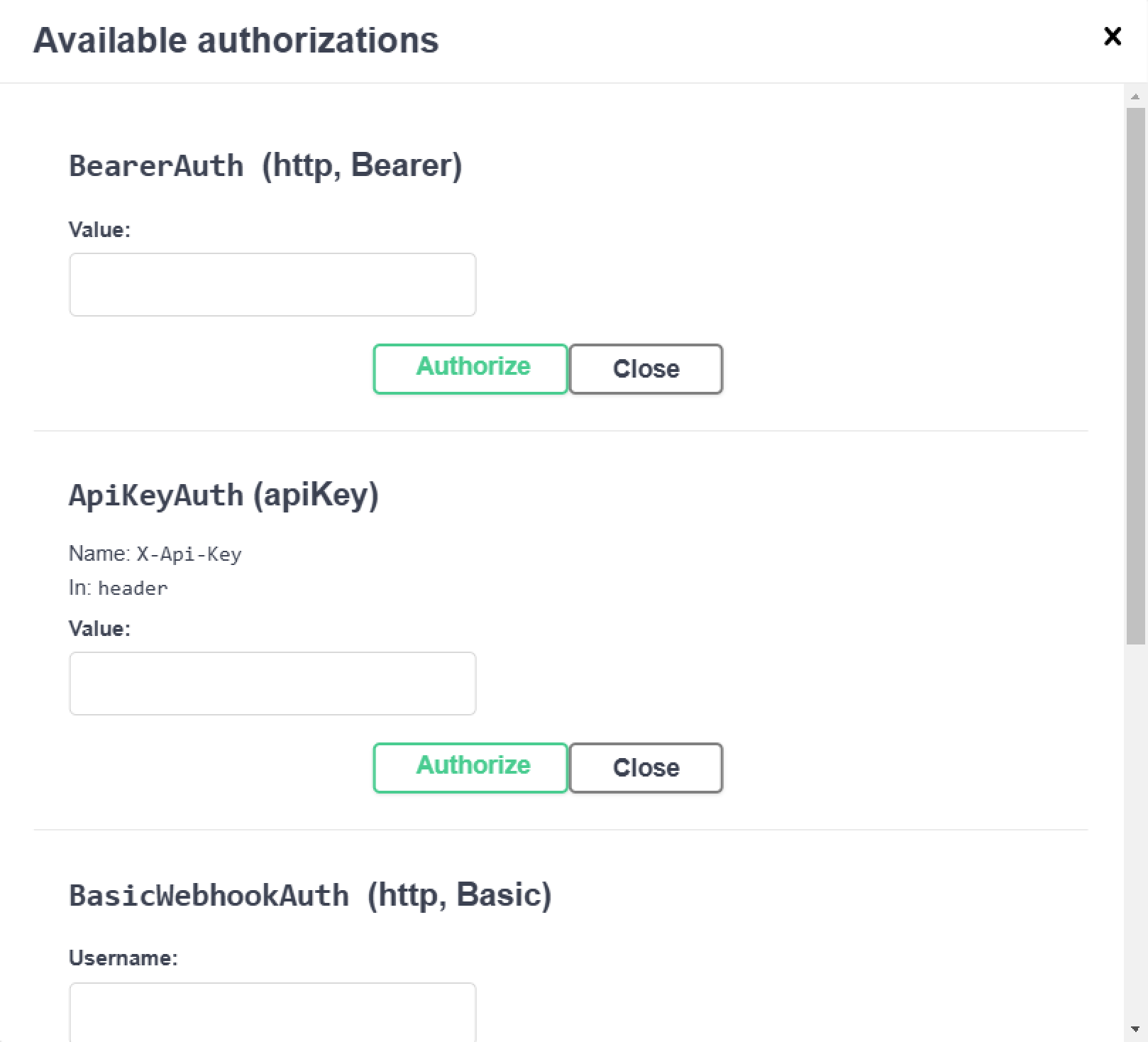
- fill in ApiKeyAuth (apiKey), (use the API key you received in the Author’s personal account interface at lava.top: Integrations → API → Create API Key (we explained this in more detail here)):
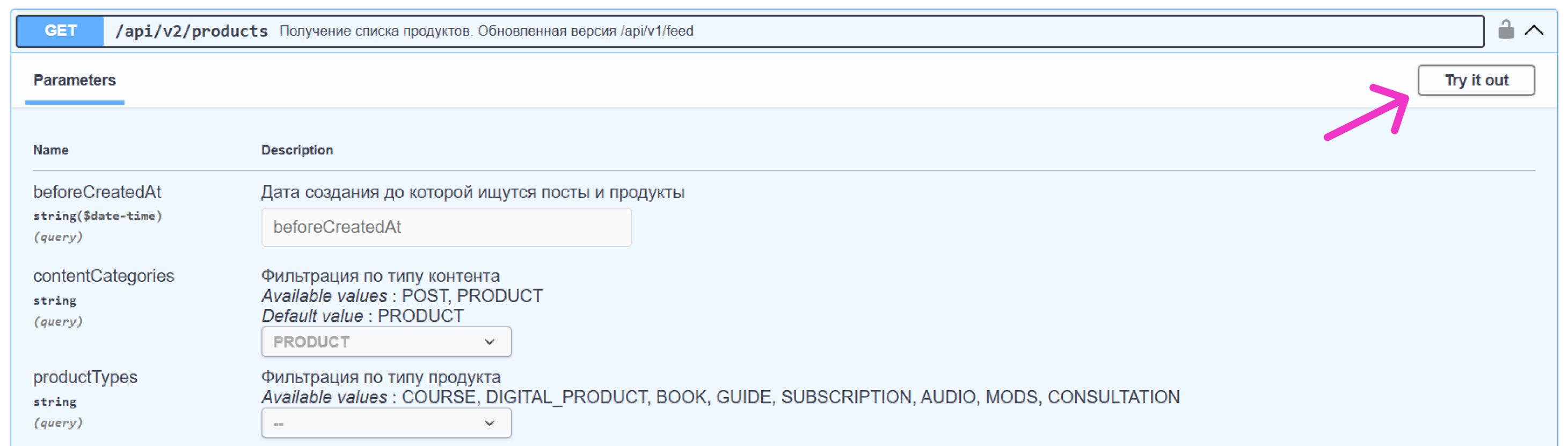
- click Try it out, enter the required data, and select Execute:
Creating an Invoice for a Custom Amount via API
Creating an Invoice for a Custom Amount via API
If your content is offered through your own landing pages, CRM or custom services, you don't need to update the product price manually each time. Instead, publish content with the “Price on request via API” option enabled and pass the amount directly in the invoice creation request.
In the lava.top interface, when publishing a Digital Product, Consultation, or Course, enable the “Price on request via API” option. The pricing block will be hidden. The product will only be available via direct link and through the API.
Use the POST /api/v3/invoice method. Pass the offerId of the product published with the “Price on request” option enabled, as well as amount and currency in the request body.
1.curl --location 'https://gate.lava.top/api/v3/invoice' \2. --header 'Accept: application/json' \3. --header 'X-Api-Key: {api_key}' \4. --header 'Content-Type: application/json' \5. --data-raw '{6. "email": "client@example.com",7. "offerId": "836b9fc5-7ae9-4a27-9642-592bc44072b7",8. "currency": "EUR",9. "amount": 12010. }'
Specifying the provider
1.curl --location 'https://gate.lava.top/api/v3/invoice' \2. --header 'Accept: application/json' \3. --header 'X-Api-Key: {api_key}' \4. --header 'Content-Type: application/json' \5. --data-raw '{6. "email": "client@example.com",7. "offerId": "836b9fc5-7ae9-4a27-9642-592bc44072b7",8. "currency": "EUR",9. "amount": 120,10. "paymentProvider": "PAYPAL"11. }'
Returning the customer after payment
Returning the customer after payment
If you sell through your own website, landing page, or bot, it makes sense for the customer to return to you after payment rather than stay on a lava.top page. Pass the addresses of your pages when creating an invoice, and we will send the customer there as soon as the payment result is known. You can set separate addresses for successful payment, failed payment, and cancellation.
Use the POST /api/v3/invoice method. Add the optional successful_return_url, failure_return_url, and cancel_return_url fields to the request body. You can pass any subset — one field, two, or all three.
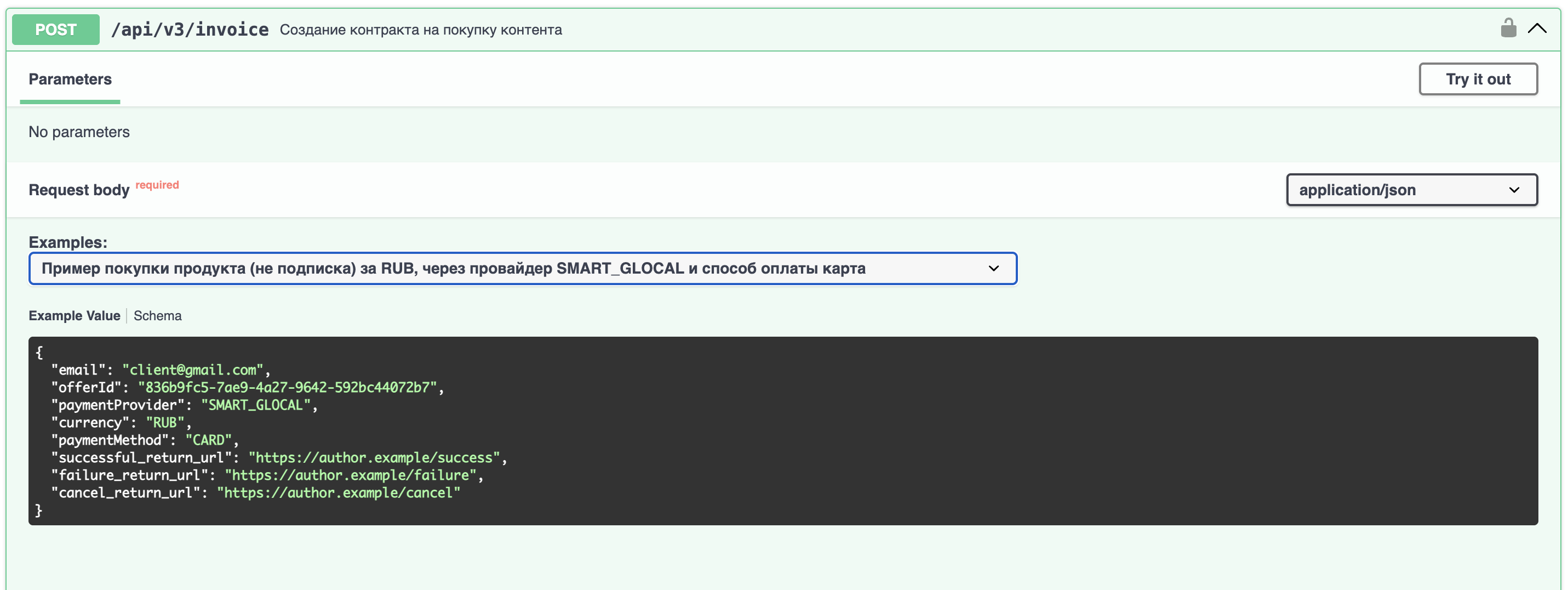
All three query
1.curl --location 'https://gate.lava.top/api/v3/invoice' \2. --header 'Accept: application/json' \3. --header 'X-Api-Key: {api_key}' \4. --header 'Content-Type: application/json' \5. --data-raw '{6. "email": "client@example.com",7. "offerId": "836b9fc5-7ae9-4a27-9642-592bc44072b7",8. "currency": "EUR",9. "successful_return_url": "https://school.example.com/thanks",10. "failure_return_url": "https://school.example.com/payment-error",11. "cancel_return_url": "https://school.example.com/checkout"12. }'
Successful payment page only
1.curl --location 'https://gate.lava.top/api/v3/invoice' \2. --header 'Accept: application/json' \3. --header 'X-Api-Key: {api_key}' \4. --header 'Content-Type: application/json' \5. --data-raw '{6. "email": "client@example.com",7. "offerId": "836b9fc5-7ae9-4a27-9642-592bc44072b7",8. "currency": "EUR",9. "paymentProvider": "PAYPAL",10. "successful_return_url": "https://school.example.com/thanks?utm_source=lava"11. }'
| Query | Descriprion |
|---|---|
| successful_return_url | The page the customer returns to after a successful payment |
| failure_return_url | The page for a failed payment |
| cancel_return_url | The page for a cancelled payment |
Requirements for values:
- https scheme only
- Absolute URL
- Up to 512 characters per field
After payment, the customer first returns to a lava.top page and is then redirected to your address.
The intermediate page shows a loading indicator and does not repeat the payment status — the customer has already seen it in the payment form and will see it on your page.
Target: successful_return_url
If not passed: Final status on the lava.top page
Target: failure_return_url
If not passed: Final status on the lava.top page
Target: cancel_return_url
If not passed: failure_return_url, if passed, otherwise the final status
We add two parameters to your address:
- invoiceId — The invoice ID
- status — success / failed / cancelled
Your own query parameters are preserved; ours are appended with &. If the address contains a fragment (#), the parameters are added before it.
Example: https://school.example.com/thanks?utm_source=lava becomes https://school.example.com/thanks?utm_source=lava&invoiceId=3fa85f64-5717-4562-b3fc-2c963f66afa6&status=success.
The status parameter is not a payment confirmation and must not be used to grant access to content.
It is a value in the address bar and can be forged on the customer's side. The source of truth for the payment state is the payment.success webhook and the GET /api/v1/invoices/{id} method.
No customer personal data is passed in the return URL. Email and other data are not added to the parameters: the address bar ends up in logs, browser history, and the referer header.
- Applies only to invoices created via the API. Does not apply to direct sales on lava.top
- For subscriptions, applies only to the first payment. Renewals run without a browser session
- If the automatic redirect fails, the customer stays on our page and sees a link to continue manually
API Libraries
API Libraries
We’ve prepared several open-source libraries to help you use our platform more easily and efficiently.
Our API follows the Open API (Swagger) specification, which can be complex to work with — these libraries are designed to simplify the process.
!Python
Get the package PyPI, typically via pip:
1.pip install lava-top-sdk
Make sure that, however you install lava-top-sdk, you install its dependencies as well.
!TypeScript
Available on npm
1.npm install --save lava-top-sdk
!Kotlin
Get the artifact from Maven
1.<dependency>2. <groupId>top.lava</groupId>3. <artifactId>lava-top-kotlin-sdk</artifactId>4. <version>1.0.0</version>5.</dependency>
Clients and API Keys
Clients and API Keys
Lava.top uses two types of API keys, each serving a specific role in the integration process:
This key is used by your system to send API requests to lava.top. It allows us to identify and authorize your application.
This key is generated on your side and shared with lava.top. The platform uses it to sign webhook requests by adding it to the X-Api-Key HTTP header when sending data to your server.
Errors
Errors
Lava.top uses standard HTTP response codes to indicate whether an API request was successful or if an error occurred.
All outgoing connections originate from the IP address 158.160.60.174
If the webhook is not delivered, the system will automatically try to resend it to the specified URL. The first attempt will be in one second, the second in five seconds, and the third in 15 seconds. The system will then make ten attempts with an interval of one minute. After that, if unsuccessful, the system will make five more attempts with an interval of one hour.
Up to 20 attempts will be made in total.
The most common errors:
| Code | Descriprion |
|---|---|
| 400 | Bad Request: the request is malformed. Check the syntax, parameters, and size limits. When creating an invoice, this error is also returned if a return URL does not use https, is not an absolute URL, or exceeds 512 characters. |
| 401 | Unauthorized: Authentication error. Verify your API key, OAuth token, token expiration, or required scopes. |
| 403 | Forbidden: Access to the resource is denied. You may lack permissions or be trying to access a restricted resource. |
| 404 | Not Found: The resource was not found. Check the URL, object ID, or whether the resource exists in your account. |
| 405 | Method Not Allowed: The HTTP method is not supported for this endpoint. Refer to the API documentation. |
| 406 | Not Acceptable: Unsupported request or response format. The API only supports application/json. |
| 408 | Request Timeout: The server timed out waiting for the request to complete. Try resending with smaller data payloads. |
| 410 | Gone: The resource has been permanently deleted and is no longer available. |
| 429 | Too Many Requests: Rate limit exceeded. Reduce the frequency of requests. |
| 500 | Internal Server Error: A server-side error occurred. Try again later. |
| 503 | Service Unavailable: The service is temporarily unavailable due to maintenance or overload. Please try again later. |
Rate Limits
Rate Limits
Lava.top applies request rate limiting to protect against overload and ensure stable API performance.
Webhook
Webhook
As mentioned earlier, in the Integration section, you can create API keys and add webhooks.
You can also view the sending attempt history, check the status of each webhook, and re-send any webhook that failed to be delivered or processed.
!Webhook History
You can find the webhook history in your account card. To access it, go to Integrations → API → Webhook history (button in the upper right corner of the page).

This section logs all events linked to your configured webhooks. Events are categorized by type, status, and the API Key + webhook pair.
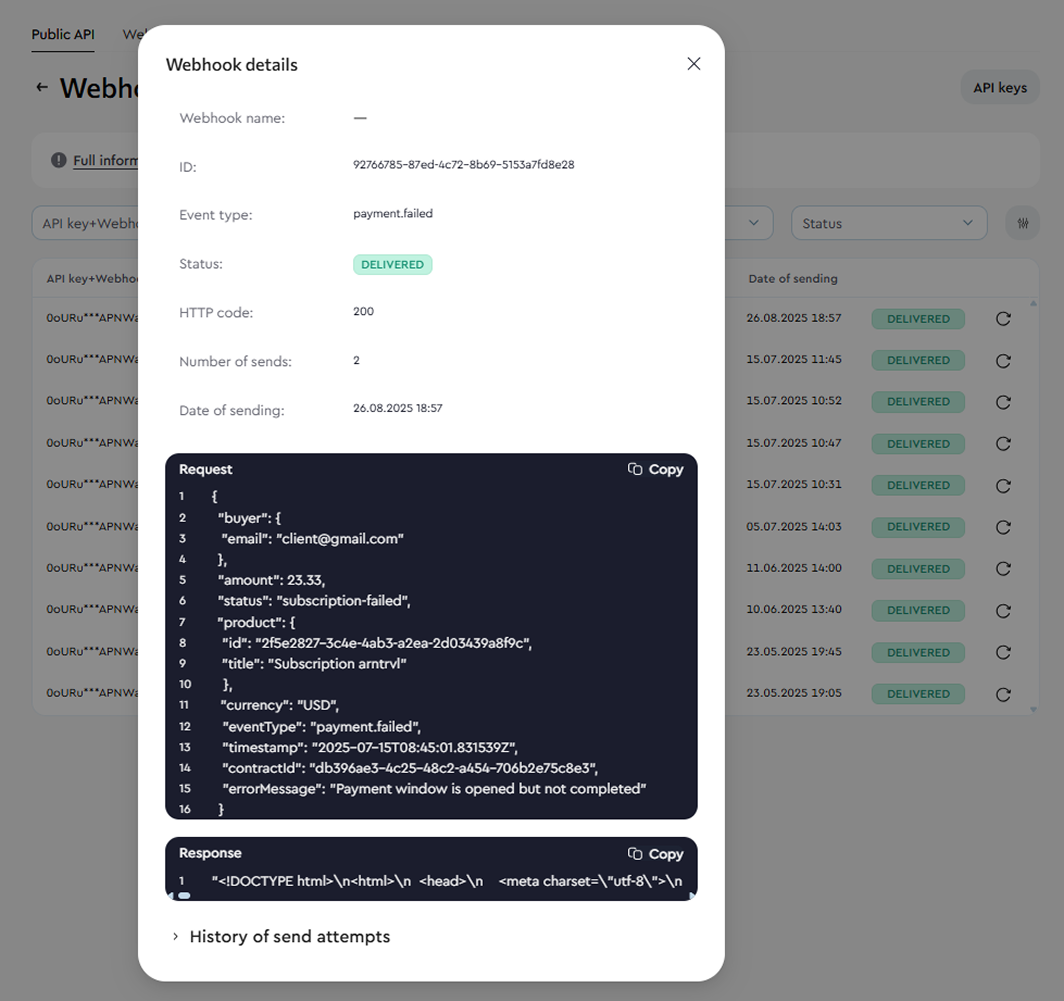
In the payment details, you can view the full request body sent at the time of the event, along with the delivery attempt history (in case of a failed subscription charge, the webhook is sent only after the final attempt (i.e., if there were three charge attempts, the webhook will be triggered only after the third one)). To see these details, simply click on the corresponding webhook entry.
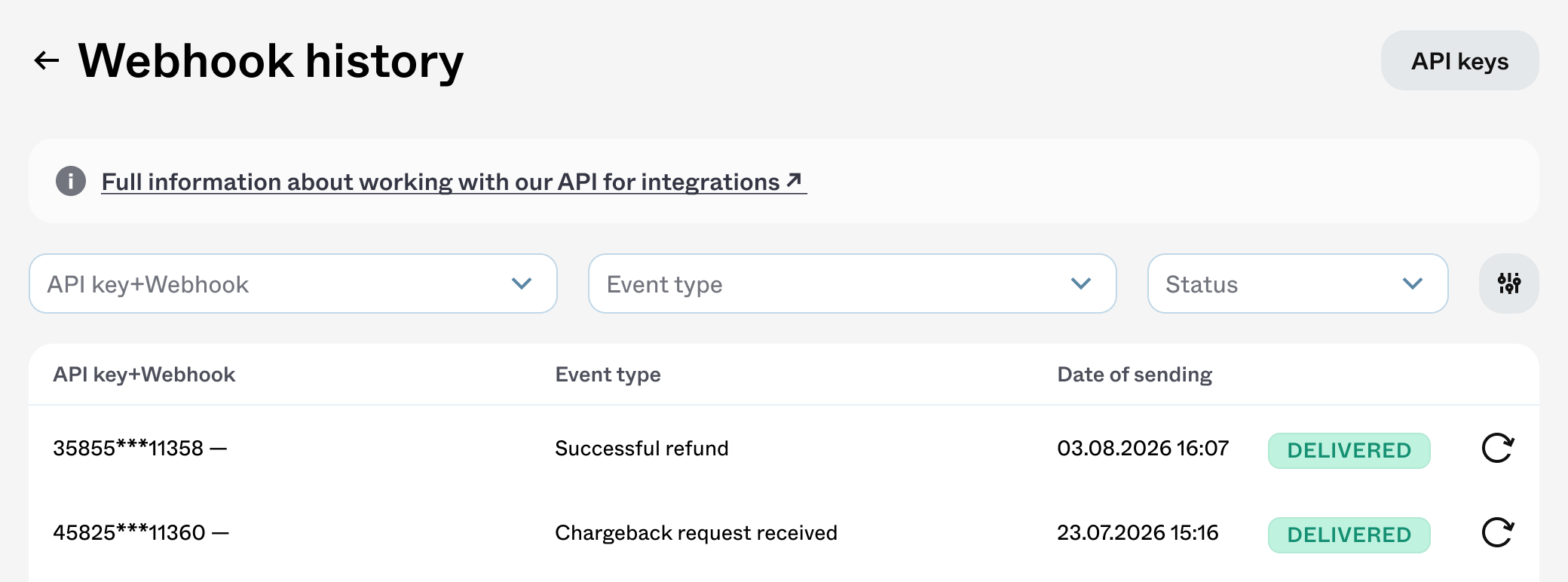
Advanced filters are available to help you quickly find the webhook you need — you can search by Buyer's email, Invoice ID, Product name, or Product ID.
!Events Types
Each event is associated with a payment type and a contract status.
Payment Types:
- one-time payment (purchasing a digital product, course, consultation, or the first payment in a subscription);
- recurring payment (subscription renewal or cancellation).
Contract Statuses:
- success (payment was successful);
- failed (payment was not completed, e.g. insufficient funds);
- cancelled (the subscription was cancelled).
Based on this, you may encounter the following Event types:
- payment.success — successful purchase of a product (not a donation) or the first subscription payment;
- payment.failed — failed product purchase (not a donation) or failed first subscription payment;
- subscription.recurring.payment.success — successful renewal of a subscription (second, third, and later payments);
- subscription.recurring.payment.failed — failed subscription renewal;
- subscription.cancelled — cancellation of a previously active subscription;
- refund.success — a full or partial refund on a sale has been completed;
- chargeback.initiated — the customer has opened a dispute through their bank.
To receive events, create a webhook and select the events you need in the "Event type" field. There are no restrictions on combinations: a single webhook can receive one event or all seven. See "Setting up the integration" for how the options map to event types:
!Refund and chargeback events
Refunds and chargebacks happen after a sale is completed and affect both your balance and the customer's access to content. These events let you revoke access in your system automatically and reconcile your records without manual exports.
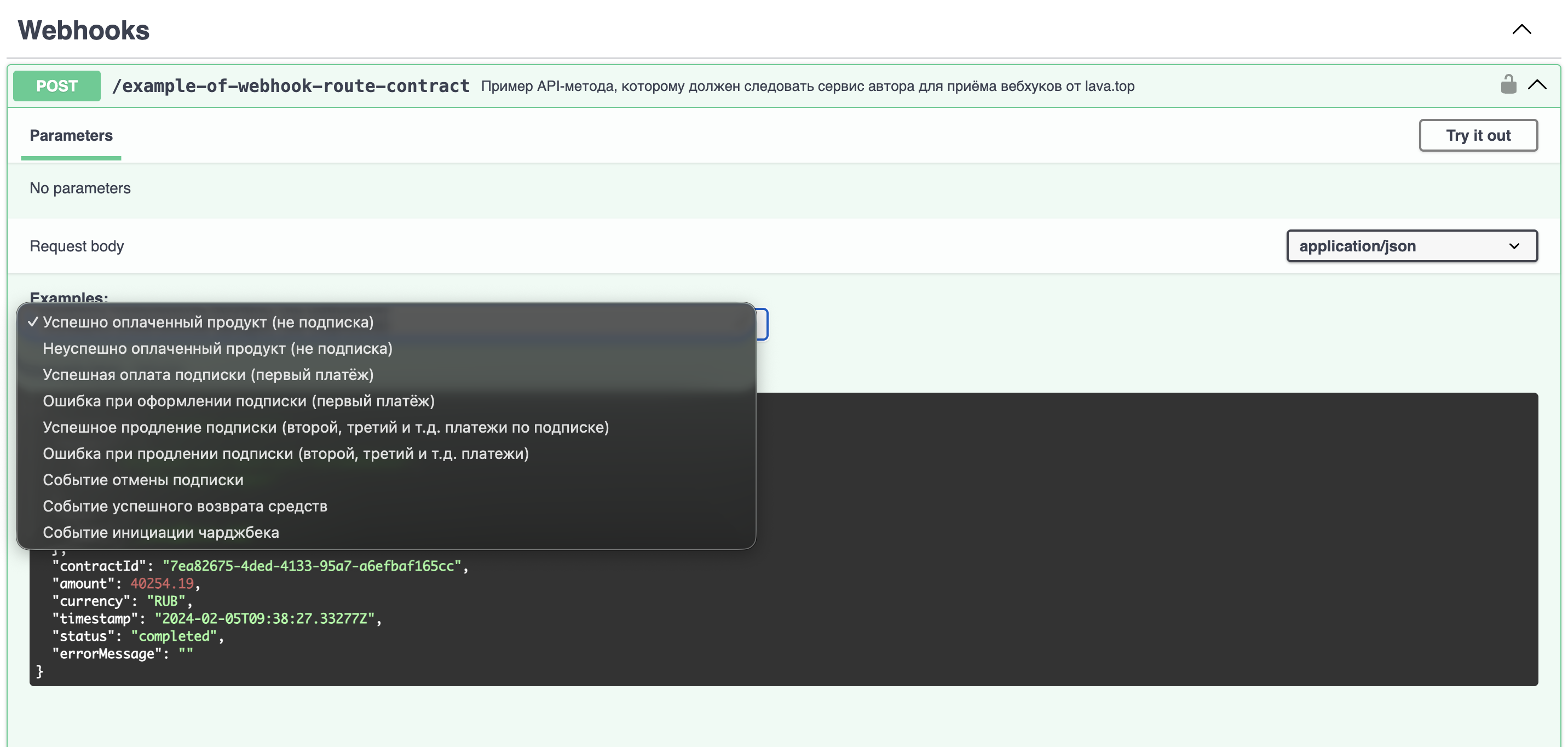
| Event | When it is sent | Balance state |
|---|---|---|
| refund.success | When a refund is executed on the lava.top side, regardless of the initiator | The refunded amount is debited; the platform fee is not returned |
| chargeback.initiated | When we receive the dispute from the acquirer | The disputed amount and the provider fee are debited. If the balance goes negative, payouts are blocked |
Both events arrive in a common envelope. The event body is in the data field; its contents depend on the event type.
1.{2. "event_id": "7ea82675-4ded-4133-95a7-a6efbaf165cc",3. "event_type": "refund.success",4. "created_at": "2024-02-05T09:38:27.33277Z",5. "data": { }6.}
The refund.success and chargeback.initiated events use an envelope structure with snake_case field names. The payment.* and subscription.* events keep their existing format — a flat structure with camelCase field names (eventType, contractId, buyer).
If your handler receives all event types on a single URL, take this into account when parsing.
Payload eventrefund.success
1.{2. "event_id": "7ea82675-4ded-4133-95a7-a6efbaf165cc",3. "event_type": "refund.success",4. "created_at": "2024-02-05T09:38:27.33277Z",5. "data": {6. "refund_id": "7ea82675-4ded-4133-95a7-a6efbaf165cc",7. "refund_type": "full",8. "initiator": "creator",9. "amount": 400.00,10. "currency": "EUR",11. "product": {12. "product_name": "Test product",13. "product_id": "d31384b8-e412-4be5-a2ec-297ae6666c8f",14. "product_type": "DIGITAL_PRODUCT",15. "tier_id": "836b9fc5-7ae9-4a27-9642-592bc44072b7"16. },17. "customer_email": "test@lava.top",18. "balance_impact": {19. "debited_amount": 368.00,20. "currency": "EUR"21. },22. "subscription_cancelled": false23. }24.}
| Field | Descriprion |
|---|---|
| refund_id | The refund ID |
| refund_type | full or partial |
| initiator | creator, admin (support), or system |
| amount, currency | The refunded amount and currency |
| product | The product the refund applies to |
| customer_email | The customer's email |
| balance_impact.debited_amount | The amount debited from your balance |
| subscription_cancelled | Whether this refund cancelled the subscription |
Payload event chargeback.initiated
1.{2. "event_id": "a1b2c3d4-e5f6-7890-abcd-ef1234567890",3. "event_type": "chargeback.initiated",4. "created_at": "2024-02-05T09:38:27.33277Z",5. "data": {6. "chargeback_id": "a1b2c3d4-e5f6-7890-abcd-ef1234567890",7. "dispute_date": "2024-02-05",8. "reason_category": "fraud",9. "reason_description": "Fraudulent transaction",10. "amount": 400.00,11. "currency": "EUR",12. "product": {13. "product_name": "Test product",14. "product_id": "d31384b8-e412-4be5-a2ec-297ae6666c8f",15. "product_type": "DIGITAL_PRODUCT",16. "tier_id": "836b9fc5-7ae9-4a27-9642-592bc44072b7"17. },18. "customer_email": "test@lava.top",19. "balance_impact": {20. "debited_amount": 400.00,21. "provider_fee": 40.00,22. "currency": "EUR"23. },24. "subscription_cancelled": false25. }26.}
| Field | Descriprion |
|---|---|
| chargeback_id | The chargeback ID |
| dispute_date | The date the dispute was opened |
| reason_category | The dispute reason category, provided by the customer's bank |
| reason_description | The bank's description, if provided |
| amount, currency | The disputed amount and currency |
| balance_impact.debited_amount | The disputed amount withheld |
| balance_impact.provider_fee | The provider fee for handling the dispute |
| subscription_cancelled | Whether this chargeback cancelled the subscription |
- Use event_id to guard against duplicate processing. It does not change between retries.
- Delivery order is not guaranteed. Rely on event_id and created_at, not on the order in which events arrive.
- A refund and a subscription cancellation are independent. A refund does not necessarily cancel the subscription.
- Each partial refund produces a separate event with its own event_id and refund_id.
- Return 2xx for any event type, including unknown ones.
If a refund or chargeback cancels the subscription, the subscription_cancelled field is set to true, and a separate subscription.cancelled event is also sent in the existing format.
To receive it, select "Subscription cancelled" in your webhook settings.
Do not process the same cancellation twice: use subscription_cancelled for an immediate reaction, and subscription.cancelled as the primary subscription lifecycle event, with its cancelledAt and willExpireAt dates.
- We notify you when a dispute is opened. The chargeback outcome — won, lost, or withdrawn by the customer — is not reported via webhook.
- A chargeback on a donate is sent even though refunds on donates are not allowed by the platform policy: a chargeback is initiated by the bank, not by the platform.
- A refund is not possible on a transaction that has a chargeback. No refund.success event is sent for it.
- If a chargeback follows a partial refund, the amount field contains the disputed remainder, not the full sale amount.
!Webhook Status
The status indicates whether the webhook was successfully received.
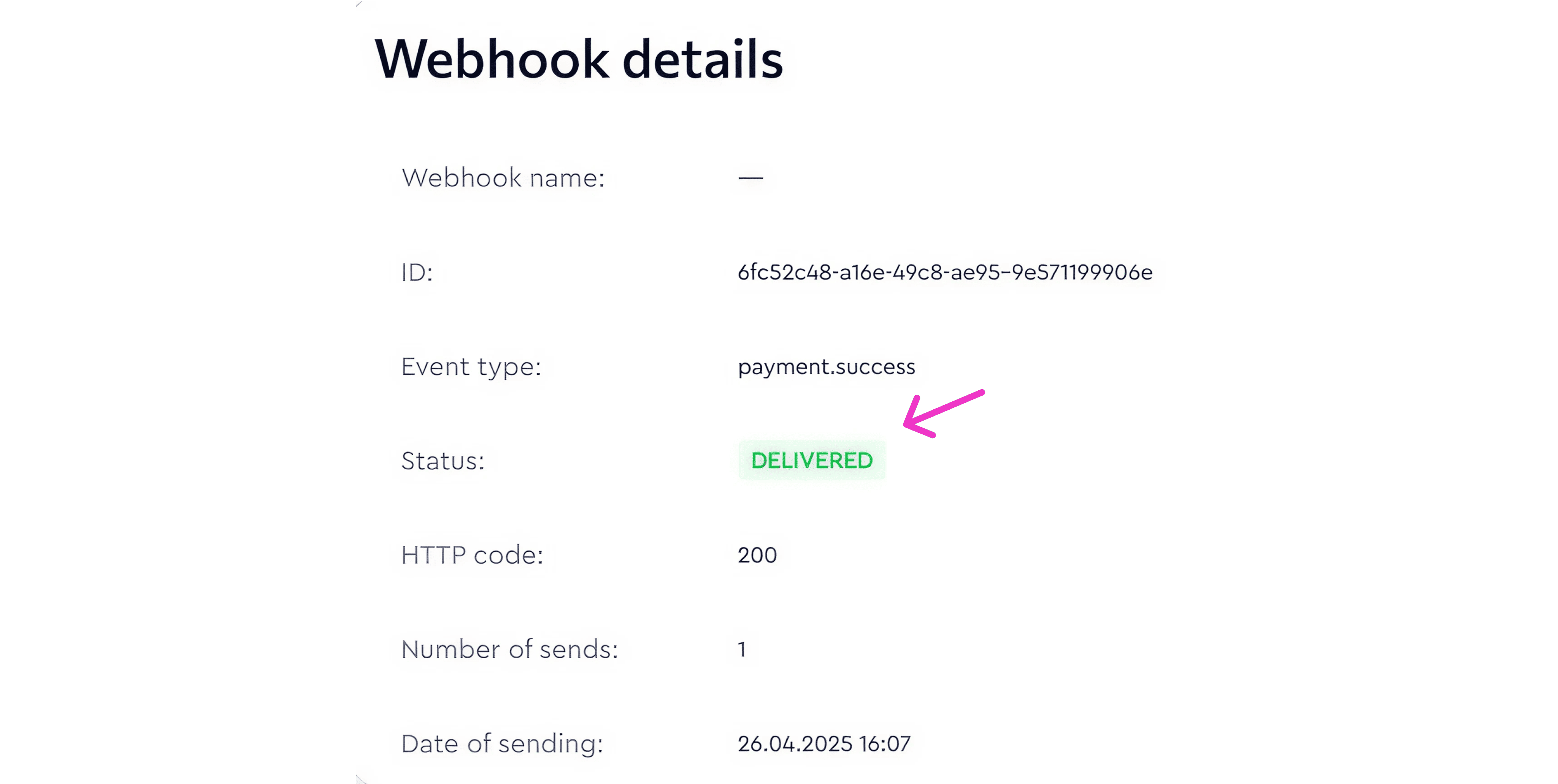
A webhook can have one of two statuses:
- DELIVERED — the webhook was successfully delivered.
- FAILED — the webhook delivery failed.
The status is determined based on the HTTP response code returned by your server when the event is sent.
!Retry Policy
Lava.top uses HTTP status codes to determine whether an API request was successfully processed or failed.
If a webhook delivery fails (i.e., a non-successful HTTP status code is returned), lava.top will retry the delivery up to 19 additional times, for a total of 20 attempts.
If webhooks were not delivered, the system will attempt to resend them to the specified URL. Repeated attempts are made according to the logic: first 1s, 5s, 15s, then 10 attempts with an interval of 1 min, then, if unsuccessful, another 5 attempts with an interval of 1 hour.
In total, 20 delivery attempts will be made.
Each attempt is logged in the webhook history with the corresponding HTTP status code. If a successful status code is received, no further retries will be made. In that case, you’ll see only one event logged (successful or failed payment).
In case of an unsuccessful response, up to 20 attempts may be made (retries stop after a successful delivery or after 19 retry attempts).
You can view all retry attempts in the "Sending attempt history" section of the webhook details.
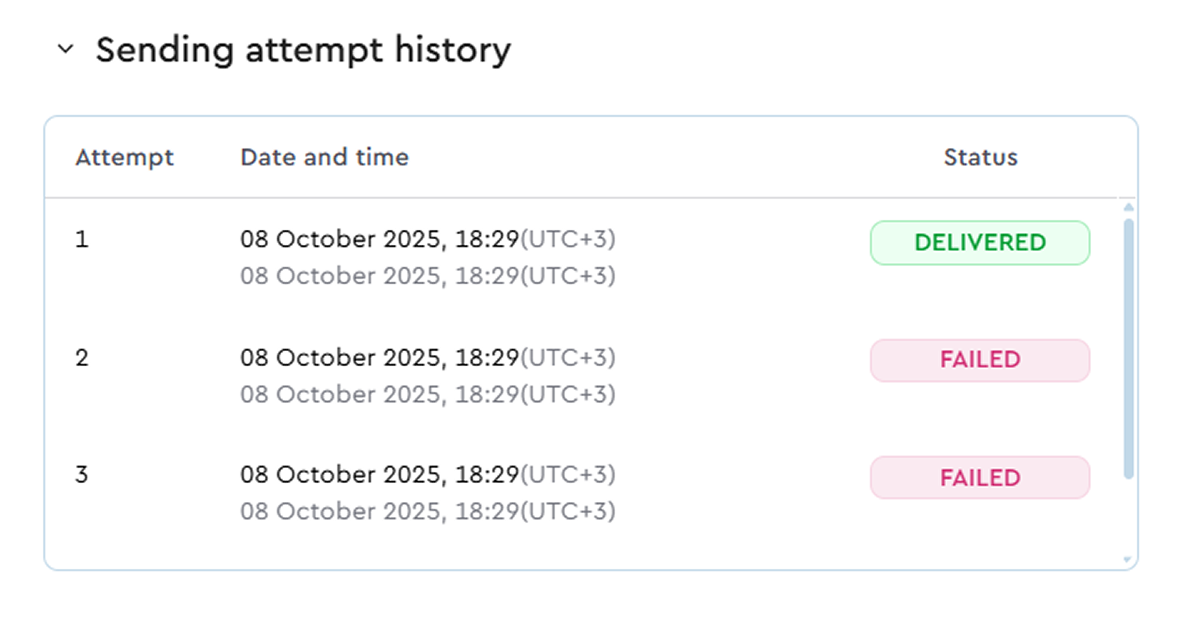
Most common response codes:
- Code 401 / Code 403 — Invalid authentication data; access to the webhook handler is denied;
- Code 404 — The webhook contains an incorrect URL (the link to the author's server that receives and processes the webhook is invalid)
- Code 500 — An error occurred on the author's server that is responsible for handling the webhook.
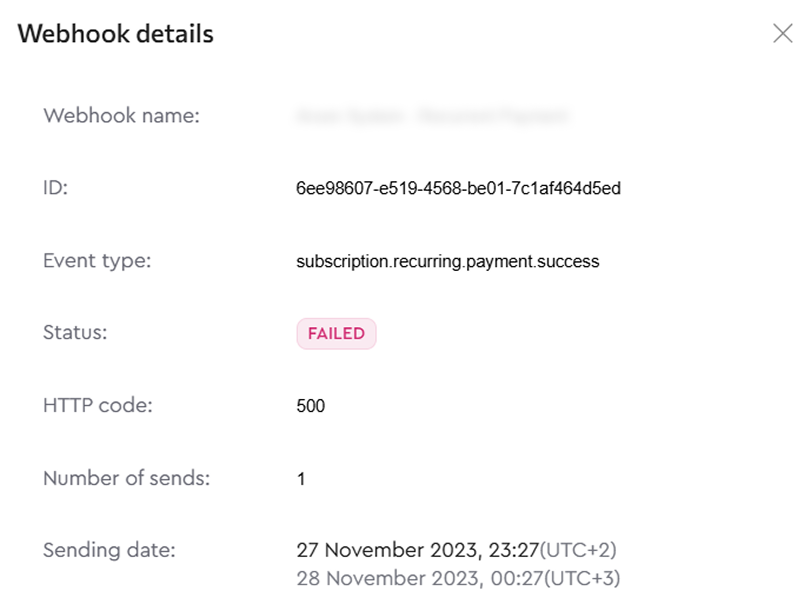
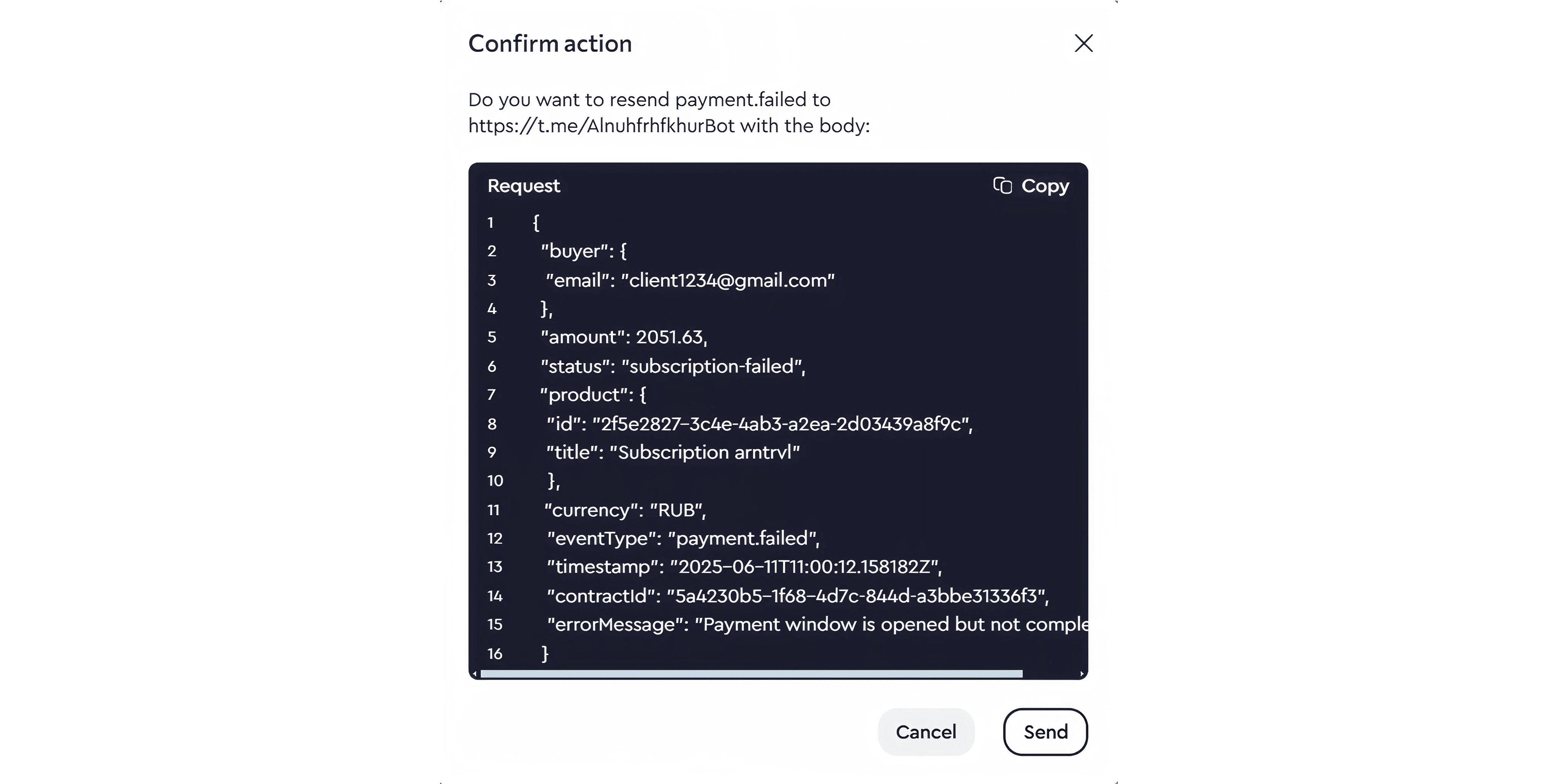
!Webhook Resend
You can manually resend any webhook by clicking the arrow icon next to it.
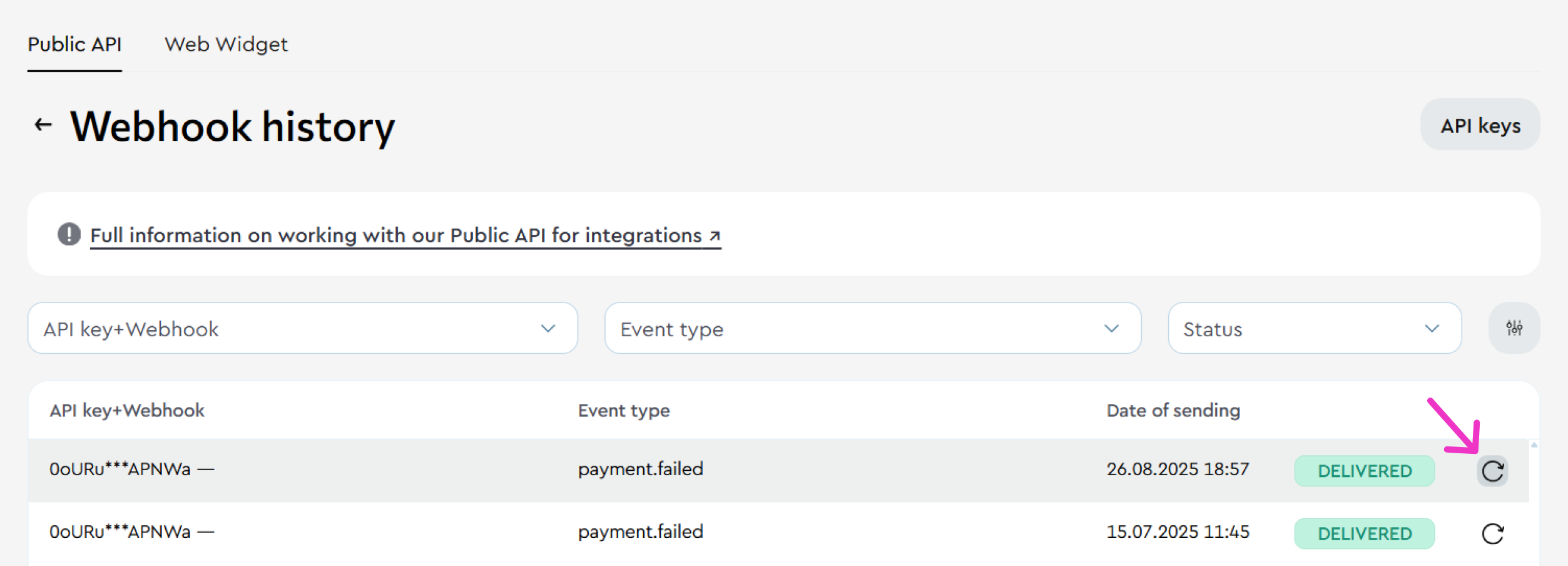
Click the icon and confirm the resend action.
Changelog
Changelog
We regularly improve integration capabilities by adding new features, fixing bugs, and updating the documentation. Here you can keep track of all the changes.
Refund and chargeback webhooks added.
- New event types: refund.success — a full or partial refund on a sale; chargeback.initiated — a payment dispute raised by the customer's bank.
- Select the new events in your webhook settings: Integrations → API, the "Event type" field.
- The payload includes the balance impact: the debited amount and the provider fee.
- The subscription_cancelled field indicates whether the event cancelled the subscription. When it does, a separate subscription.cancelled event is also sent.
You can now return the customer to your own page after payment.
- POST /api/v3/invoice accepts three optional fields: successful_return_url, failure_return_url, cancel_return_url.
- The return URL receives the invoiceId and status parameters.
- If no addresses are passed, the post-payment flow is unchanged.
Before you update your integration.
- Make sure your handler returns 2xx for unknown event types before enabling the new events.
- The status parameter in the return URL is not a payment confirmation. Grant access based on the webhook.
Added the ability to create an invoice for a custom amount via API.
Implemented the POST /api/v3/invoice method with support for amount and currency parameters for products published with the “Price on request via API” option enabled.
Supported content types: Digital product, Consultation, Course.
Supported currencies: RUB, USD, EUR. Contract type: ONE_TIME.
Updated navigation for the "Integrations" section.
A standalone “Integrations” section has been added to the Creator Dashboard sidebar menu. API Key and Webhook management has been moved here from the Profile section. Navigation path: Integrations → API.
Subscription payments via Stripe are now supported.
Implemented /api/v2/invoices and /api/v2/invoices/{id} endpoints with updated contract typing:
- INVOICE - payment for products, consultations, or courses,
- SUBSCRIPTION_FIRST_INVOICE - first subscription charge,
- SUBSCRIPTION_RENEWAL - recurring subscription payment.
Donation payments via Stripe are now supported.
Improved GET /invoices request: now returns the parentInvoiceId field (ID of the parent transaction for subscriptions).
PayPal support added:
- Subscription payments,
- Donation sending.
Webhook improvements:
- Manual retry option,
- Webhook list retrieval,
- Event type now included in the webhook payload,
- Ability to search webhooks by Product ID in the Author Dashboard (Integrations → API → Webhook History).
UTM tags added.
Stripe payment support added for digital products.
FAQs
FAQs
Here we've collected the most frequently asked questions that may come up when using our API.